
Are you looking to automate your trading strategies? Nowadays, there are options to start automated trading in both the National Stock Exchange as well as MCX od Multi Commodity Exchange. In this article, I will show you how to automate your trading strategies using AmiBroker, the world’s best charting platform. In AmiBroker, you have the ability to code your own strategies, backtest them, and then attach the strategy to your terminal to produce a fully automatic trading system.
For more info on the latest algo trading trends, you may read my post on algorithmic trade setup in Zerodha Pi.
What’s Automated Trading?
Algo trading is a whole TA (Technical Analysis) based “trading system” for retail traders of sub-brokers. It’s completely hands-free, you need to run the computer, feed the strategy to your trading terminal and leave the screen. Trading will take place automatically, and profits or losses will also be generated automatically.




What this implies is that rather than simply charting, you could actually write a strategy, backtest it to see if it might have made cash and as soon as determined that you can take the strategy live, you can take it semi-automatic. You will not need any exchange permission or SEBI permission if you start it semi-automated. In case you’d like to completely automate your trades, you’ll have to enrol in a Dealer Terminal. This is a good way to have an extra approach to automate the trades. We can even get assistance from skilled programmers to provide an explanation for tips on how to convert your technical prognosis strategy into code.
Needless to say, algo trading is in line with technical analysis.
How to Start Automated Trading with Amibroker?
Check the following video to learn how to start algo trading, auto trading or ATS in NSE or MCX.
Step-by-Step Guide
- Firstly, you need to have a Nest Trader terminal from your broker (this is a must). This time, we will use Amibroker for signal generation.
- Needless to say, you need to have Nest Plus and the Plus Trading Plugin from your broker.
- Firstly, open a blank chart in Amibroker.
- Then attach any buy-sell AFL on it.
- And now attach the auto trading plugin to the chart.
- Now specify trade details.
- Now let’s repeat this with a few more symbols.
- Finally, we checked for any errors, and let’s watch our Nest Trader.
- Check orders are flowing now; I have ignored them for now. Watch the image below for a complete understanding.
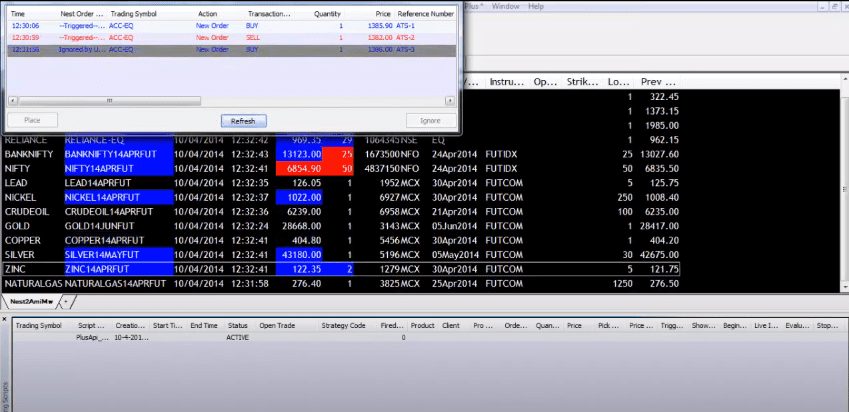
- As we have given a slippage in the Amibroker, though it was a limit order, it still got filled.
- As this is a retail client terminal, you need to press the place button to send the order to the exchange.
- In the case of the dealer terminal, it will be fully automatic.
Conclusion
This is a republished version of our write-up from 2014. Nowadays, we do not provide any support for automated trading to our clients. Also, the Nest Trader terminal is obsolete now. Hence, this method does not work anymore. However, things are much easier with tools like Streak or Upstox terminals. But before going live with your trades, we suggest you backtest your strategies thoroughly.